Polaris
Polaris PCX 868 iQ Smart Robotic Pool Cleaner | Cleans In-Ground Pools up to 50ft with Smart App Control, Large Filter Canister, and Easy-Lift Removal
Disclosure: We may earn a commission when you buy through links on this page, at no extra cost to you. As an Amazon Associate I earn from qualifying purchases. Learn more
Highlights
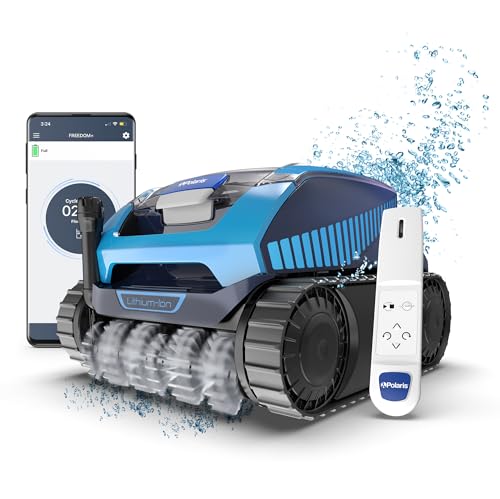
- Control Anywhere, Anytime with iAquaLink: The PCX 868 iQ connects to home WiFi, giving you access anytime, anywhere with the highest-rated pool control app in the industry, iAquaLink. You can Start/Stop a cleaning cycle, view the cycle timer, choose your cleaning mode, use as a remote control, initiate the lift system, and receive troubleshooting — all from the palm of your hand.
- Double Helix Brushes: A proprietary brush design composed of strategically staggered rubber blades, the PCX 868 iQ cleaner's front and rear brushes gently agitate stuck-on dirt and draw in debris, channeling it towards the large inlet for more effective cleaning.
- Easy Clean Filter Canister: Easy to access, the large filter canister has a transparent window which allows you to view when it’s full —then simply remove the canister, shake, and spray away debris. You never need to touch debris again!
- Easy Lift Removal System: With the touch of a button on the control unit or iAquaLink App, PCX 868 iQ automatically climbs to the waterline and rapidly evacuates water for lightweight removal.
- Polaris Robotic Pool Cleaners: For more than 50 years, Polaris has been known worldwide for its quality and premium cleaning power. This visionary class of pool cleaners has become the benchmark against which all others are measured. Focused on premium engineering, rugged construction, and reliability, Polaris pool cleaners are built to last and are proven to clean where others can't.
Why You'll Love It
- Manage cleaning cycles remotely through iAquaLink, including starting, stopping, changing modes, and checking the cycle timer
- Staggered rubber blade brushes loosen stuck-on dirt and guide debris toward the cleaner's large inlet
- Check the transparent filter window to see when the canister needs emptying, without opening it first
- Remove collected debris by taking out the canister, shaking it, and rinsing it with a spray
- Activate Easy Lift to bring the cleaner to the waterline and evacuate water for easier removal
- Control the lift system through either the control unit or the iAquaLink app
Pros
- +Remote cleaning control through iAquaLink
- +Front and rear debris-agitating brushes
- +Visible filter fill level
- +Waterline climbing and water evacuation for removal
- +Designed for in-ground pools up to 50 feet
Cons
- -Requires home WiFi for app connectivity
- -Filter canister still needs manual emptying and rinsing
- -Designed around a stated in-ground pool size limit
Detailed Review
The Polaris PCX 868 iQ robotic pool cleaner is designed for in-ground pools up to 50 feet, with remote controls and a removal system that reduce the effort involved in managing cleaning sessions. Its appeal is the combination of app-based operation, brushes intended to loosen attached dirt, and a filter canister that is easy to inspect and empty. It suits pool owners who want more control over when cleaning happens and appreciate having the machine's removal process built into its design.
The iAquaLink app provides several useful controls through a home WiFi connection. You can start or stop a cleaning cycle, view its timer, select a cleaning mode, use the app as a remote control, activate the lift system, and access troubleshooting. This makes the cleaner more convenient to manage when you are away from its control unit. The practical benefit is having multiple cleaning and retrieval functions together in one interface rather than treating each task as a separate operation.
Its cleaning design centers on front and rear Double Helix brushes made with staggered rubber blades. These brushes agitate dirt that has stuck to a surface and direct loosened debris toward the large inlet. That arrangement is intended to help debris enter the cleaner rather than simply being moved around. The large filter canister also has a transparent window, allowing you to check its fill level before removing it. When it needs attention, the process is straightforward: take out the canister, shake out the debris, and spray it clean.
Removal is another important part of the design. Pressing the lift control on the unit or using the app prompts the cleaner to climb to the waterline and rapidly evacuate water, making it lighter to remove. This is particularly relevant for shoppers who want the retrieval process to involve more than simply pulling the cleaner out themselves. The feature assists with removal, although it does not eliminate the need to empty and rinse the filter canister or handle routine upkeep.
Verdict: This robotic pool cleaner is worth considering if your in-ground pool falls within its stated size limit and you value app control, visible filter monitoring, and assisted retrieval. A simpler alternative may suit you better if remote management and the lift system are not priorities, or if your pool falls outside the intended coverage.
Who Should Buy It
A great fit if you:
- Own an in-ground pool up to 50 feet and want a robotic cleaner designed for that pool size.
- Prefer managing cleaning cycles from your phone instead of relying only on the unit's physical controls.
- Want to check filter fullness through a transparent window before deciding when to clean the canister.
- Would appreciate a retrieval function that brings the cleaner to the waterline and evacuates water before removal.
- Want access to cleaning controls and troubleshooting through a connected app.
Consider something else if you:
- Have a pool outside the stated size or type, and need a cleaner specifically suited to those conditions.
- Prefer a simpler pool cleaning option without app connectivity, remote controls, or an automated lift system.
Before You Buy
Confirm on the listing:
- Check your pool's type and dimensions against the stated suitability for in-ground pools up to 50 feet.
- Confirm that your home WiFi setup can support the connectivity you want to use with iAquaLink.
- Review what is included in the package and whether any additional items are needed for your intended setup.
- Check the product instructions for any care requirements, power needs, or setup steps that apply to your pool and home.
How to compare your options: Start with pool suitability, then decide how important remote controls, filter visibility, and assisted retrieval are to your routine. The PCX 868 iQ combines these functions with front and rear brushes designed to agitate dirt and guide debris into a large inlet. Compare those practical benefits with the features you would actually use, rather than choosing solely for the number of controls offered. If app operation is a priority, give particular attention to connectivity and the available control functions.
Getting the Most From It
Begin by checking the product instructions and confirming that your pool suits the cleaner's stated coverage. Review the setup guidance before using the app, and follow the instructions for connecting the unit to your home WiFi and accessing iAquaLink.
Choose the cleaning mode that matches your intended session, then use the app to start or stop the cycle and check its timer. Keep the available controls in mind: the app can also act as a remote control, initiate retrieval, and provide troubleshooting assistance.
Make the transparent filter window part of your routine. Check the visible fill level, and when the canister needs attention, remove it, shake out the debris, and spray it clean as described by the product's cleaning process.
When you are ready to retrieve the cleaner, activate Easy Lift through the control unit or app. Allow the system to bring the cleaner to the waterline and evacuate water as intended, then follow the product instructions for handling and care. Regularly reviewing the instructions can help you use the available functions consistently.
FAQ
What type of pool is the Polaris PCX 868 iQ designed for?
It is designed for in-ground pools up to 50 feet. Check your pool's type and dimensions before choosing it.
Can I control the cleaner from my phone?
Yes, the iAquaLink app connects through home WiFi. It supports starting and stopping cycles, choosing cleaning modes, viewing the timer, remote control, lift activation, and troubleshooting.
How do I clean the filter canister?
Remove the canister, shake out the collected debris, and spray it clean. Its transparent window lets you inspect the fill level before opening it.
Does it help with removing the cleaner from the pool?
Yes, Easy Lift brings the cleaner to the waterline and rapidly evacuates water. You can activate the system from the control unit or the app.
What comes in the box, and what setup is required?
The listing does not state the complete package contents or all setup requirements. Check the current product details and instructions to confirm included items, power needs, and the steps for connecting to home WiFi.
Product Details
| Brand | Polaris |
| ASIN | B0CWWJGCGZ |